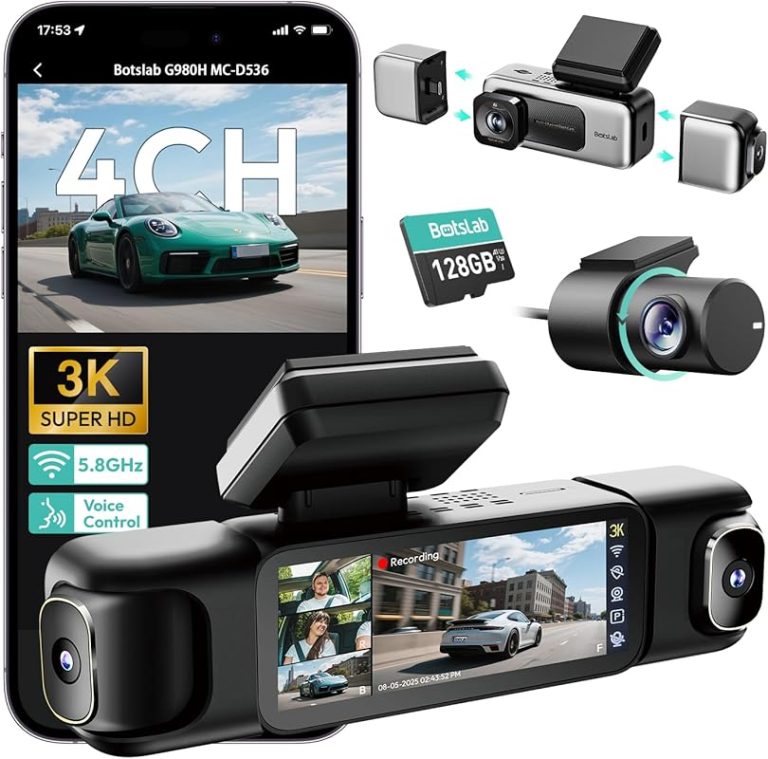
Dual Dash Cam vs Single Dash Cam: Which Is Right for You?
A single dash cam records the road ahead, while a dual dash cam records both the front and rear. Choose a dual dash cam if you want wider coverage and stronger evidence for crashes, tailgating, or incidents behind your vehicle.
A single camera costs less and installs more easily, so it may suit simple driving needs. I’ll compare coverage, video quality, installation, storage, and key features to help you choose the right setup for your vehicle.
Key Takeaways
- Single cameras cover the road ahead.
- Dual cameras add rear-facing protection.
- Your budget and vehicle needs should guide your choice.
How Camera Configurations Work
I view a dash cam’s channel count as the number of camera feeds it records at the same time. A single lens focuses on the road ahead, while a dual setup adds a second view, usually behind the vehicle or inside the cabin.
Single-Lens Recording Basics
A single dash cam uses one camera, normally mounted near the rearview mirror. It records the road ahead through the windshield and saves the footage to a memory card in a loop. When the card fills, the camera replaces older, unlocked files with newer recordings.
I would choose this setup when front-facing evidence meets my needs or when I want a simpler, lower-cost installation. A front camera can capture traffic lights, lane changes, road hazards, and impacts that occur ahead of my vehicle. It cannot directly record a rear-end collision, a vehicle approaching from behind, or activity inside the cabin.
Important features include video resolution, night performance, a wide but usable viewing angle, GPS data, and parking mode. A wider lens may show more area, but excessive width can make distant license plates harder to read.
Front-And-Rear Coverage Explained
A dual dash cam records two video streams at once. The main unit faces forward, while a second camera mounts on the rear window and connects to the front unit with a cable. I can then review what happened ahead and behind me using matching timestamps.
This arrangement helps document rear-end crashes, following-distance disputes, and vehicles that leave after a collision. It also records events behind my car while I drive or park. The rear camera needs a clear window, careful cable routing, and a suitable mounting position.
I should check whether both cameras record at the advertised resolution. Some models provide higher quality in front and lower quality at the rear. I also need enough memory-card space, since two video feeds use storage faster than one.
Coverage, Evidence, And Safety Benefits
I view a single dash cam as basic front-facing protection, while a dual system adds a second view that can clarify incidents behind the vehicle. Rear footage, parking recording, and synchronized angles can provide stronger evidence when an event involves more than what happens ahead.
Capturing Rear-End Incidents
A single dash cam cannot record a vehicle that hits you from behind. It may capture the other driver after impact, but the footage often misses the approach, following distance, and exact point of contact.
A dual dash cam records the road ahead and the area behind your vehicle at the same time. This rear view can show a tailgating driver, a sudden lane change, or a rear-end collision. I can use both recordings to compare the timing and movement from each angle.
The rear camera also helps document hit-and-run incidents. A clear view may record the vehicle, license plate, color, and direction of travel. Results depend on camera quality, lighting, window tint, weather, and the camera’s mounting position.
Monitoring Parking Events
A front-only camera mainly records activity in front of the car. It may miss a vehicle that backs into the rear bumper or scrapes the side while leaving a parking space.
A dual system gives me better coverage when the car faces a wall, another vehicle, or a traffic lane. With parking mode, the cameras may save clips after detecting motion or an impact. I need to confirm that the model supports this feature and check whether it requires a hardwire kit or an external battery.
Parking mode does not guarantee useful footage. The camera needs enough power, storage space, and light. I should also check local laws before recording people or private property.
Documenting Multiple Angles
A single camera provides one viewpoint, which may leave important details outside the frame. A dual system records the front and rear lanes, helping me establish vehicle positions, traffic movement, and the order of events.
The two cameras usually record separate files with matching time stamps. I should set the correct date and time, use a high-endurance memory card, and check that both lenses record clearly. A wide viewing angle can cover more area, but an extremely wide lens may make distant license plates harder to read.
For the best evidence, I should mount both cameras securely and keep the windshield and rear glass clean. Regularly reviewing short test clips helps confirm that the system records both views properly.
Cost, Installation, And Maintenance
I compare more than the camera price when choosing between a single and dual dash cam. A rear camera adds equipment, wiring, installation time, and storage needs, while both systems require regular checks of the memory card and power connection.
Upfront Equipment Costs
A reliable single dash cam often costs about $70–$150. A dual-channel model usually costs about $120–$300 or more, depending on video resolution, night recording, GPS, parking mode, and image quality.
A dual system normally includes a front camera, rear camera, connecting cable, and mounting hardware. I also budget for a high-endurance microSD card, which commonly costs $15–$40. Some models require a separate card for continuous recording.
Installation adds another cost. I can install a single camera with basic tools, but a professional may charge for either setup. A dual system often costs more because the installer must route a cable through the vehicle’s trim and connect the rear camera securely.
Wiring And Power Requirements
A single camera usually connects to a 12-volt socket or a USB power port. I can hide the short cable along the windshield trim, making installation fairly simple.
A dual camera uses a longer cable that runs from the front unit to the rear of the vehicle. I must route it carefully around airbags, door seals, and trim panels. I should not place the cable where it could interfere with an airbag or become pinched.
For parking mode, I need a compatible hardwire kit. This kit connects the camera to the vehicle’s fuse box and may include low-voltage protection to reduce the risk of draining the battery. A professional installation can help prevent loose connections and trim damage.
Storage And File Management
A dual dash cam creates more video files because it records two views at once. It also uses more storage space, especially when both cameras record at 1440p or 4K.
I choose a high-endurance microSD card with the capacity supported by the camera. A 128GB card may hold several hours of dual-camera footage, but recording time varies with resolution, frame rate, and compression. Parking mode can fill the card faster.
I enable loop recording, which automatically replaces older files when the card becomes full. After a crash or important event, I lock the file and copy it to my phone or computer. I also format the card in the camera at regular intervals and replace it when recording errors appear.
Choosing The Right Setup For Your Vehicle
I choose a single dash cam when front-facing evidence meets my needs and I want a simpler, lower-cost installation. I choose a dual dash cam when rear impacts, tailgating, parking incidents, or passenger activity also matter.
Daily Commuting Needs
For most daily commutes, a single dash cam records traffic lights, lane changes, sudden braking, and collisions ahead. I prefer this setup when I mainly drive alone, park in secure areas, and want a small camera with fewer cables.
A dual dash cam adds a rear camera that records vehicles behind me. I find it useful on busy highways, during frequent stop-and-go traffic, and when another driver hits my car from behind. The second camera also helps document unsafe following distances and rear-end collisions.
I check the camera’s video quality, night performance, and storage needs before choosing. A dual system uses more memory because it records two video streams. If I drive often at night or leave my car in public parking, I also look for parking mode and a suitable hardwire kit.
Rideshare And Fleet Use
I usually recommend a dual setup for rideshare drivers because it records both the road and the vehicle interior when the system includes an inside-facing camera. This can document passenger disputes, unsafe behavior, pickup locations, and traffic incidents.
A standard front-and-rear model does not always record the cabin. I check the product description carefully to confirm whether the second camera faces the rear window or the interior. For rideshare work, I also review local recording and privacy rules before installing an interior camera.
For fleet vehicles, I consider the company’s main risk. A front-only camera may suit delivery vehicles that need basic road records. A dual or multi-camera system makes more sense when managers need rear coverage, driver oversight, or evidence from several angles. I also choose durable mounts and large, reliable memory cards for frequent use.
Vehicle Type And Parking Habits
My vehicle type affects installation and camera choice. In a sedan, I can usually route a rear-camera cable through the headliner without much difficulty. An SUV, hatchback, or van may need a longer cable and a more careful route through the tailgate.
If I park on public streets or in busy lots, I place more value on parking mode and impact detection. A dual system can record activity at both ends of the vehicle, but it may need professional wiring for continuous power. I confirm that the vehicle’s battery can support this feature.
I also consider rear-window tint, windshield size, and available mounting space. Heavy tint can reduce rear-camera detail, while a large windshield may need a longer power cable. I select a compact single camera when installation space is limited and rear coverage adds little value.
Key Features To Compare Before Buying
I compare image quality, low-light performance, parking protection, impact detection, location data, and phone connectivity. These features affect how clearly I can document an incident and how easily I can save or review footage.
Video Resolution And Night Vision
I look for at least 1440p video for the front camera. A 4K front camera can capture more detail, but it may need a larger memory card and stronger processing. For a dual dash cam, I also check the rear camera’s resolution because some models pair a sharp front camera with a basic 1080p rear camera.
Night vision matters when I drive after dark. A camera with a large image sensor, wide aperture, and HDR can handle headlights, shadows, and uneven lighting better. Infrared lights mainly help an interior camera; they do not solve every problem with exterior road footage.
I also check the viewing angle and frame rate. A wide angle can cover more lanes, but an overly wide lens may distort license plates near the edges. I prefer a camera that records both channels reliably rather than one that advertises high resolution only for the front view.
Parking Mode And Impact Detection
Parking mode lets my dash cam monitor the vehicle while it sits unattended. Some models record continuously, while others start recording after detecting motion or a vibration. Buffered parking mode can save a few seconds before and after an event, which gives me more useful context.
Impact detection depends on a built-in G-sensor. I check whether I can adjust its sensitivity because a setting that is too high may save clips from bumps or closing doors. A setting that is too low may miss a light impact.
Parking mode usually needs a hardwire kit or an external battery pack. I confirm that the kit includes low-voltage protection, which cuts power before the car battery drains too far. I also check whether both front and rear cameras keep recording in parking mode.
GPS, Wi-Fi, And App Access
GPS can record speed, direction, and location with each video. I use this data to confirm where an event occurred, but I check whether the camera allows me to hide speed information before sharing a clip. GPS may use a built-in module or an external mount.
Wi-Fi lets me connect my phone directly to the dash cam. I can then preview, download, and share clips without removing the memory card. Wi-Fi usually does not provide internet access, so I may need to disconnect from mobile data while using the camera’s network.
I look for an app with clear controls, stable connections, and simple file management. I also check whether the app supports both cameras, firmware updates, and date and time settings. A camera with poor app support can make routine video retrieval difficult.
Frequently asked questions
Is a dual dash cam better than a single dash cam?
I consider a dual dash cam better for drivers who want coverage of both the road ahead and traffic behind. A single dash cam costs less and may suit drivers who mainly want front-facing evidence.
Does a rear camera record automatically?
Yes. A dual system records the front and rear views at the same time when both cameras connect correctly. I recommend checking that the rear camera cable reaches the desired mounting position before installation.
Does a dual dash cam need more storage?
Yes. Two cameras create more video files and use storage faster than one camera. I suggest using a compatible, high-endurance memory card and checking the camera’s storage limits.
Can either type record while parked?
Some models support parking mode, but the feature may require hardwiring or another constant power source. I would verify the power requirements and motion or impact settings before relying on it.
Does a rear camera improve parking visibility?
It can help when the camera includes a live display or parking guidelines. I still use the vehicle’s mirrors and direct view because a dash cam does not replace careful driving.
Which setup works best for rideshare drivers?
I usually recommend a dual or three-channel model. A three-channel system may also record the cabin, but it can cost more and may need extra storage.
Conclusion
I would choose a single dash cam when I want a simple, lower-cost setup that records the road ahead. It suits drivers who mainly need evidence of front-facing events and prefer easier installation.
I would choose a dual dash cam when rear coverage matters. A second camera can record collisions, tailgating, parking damage, and other events behind the vehicle. This added coverage usually requires more installation work, storage space, and budget.
| Priority | Better choice |
|---|---|
| Lower price and simpler setup | Single dash cam |
| Front and rear recording | Dual dash cam |
| Protection while parked | Dual dash cam with parking mode |
| Quick installation | Single dash cam |
I would also check video quality, night performance, viewing angles, GPS, parking mode, and storage needs before buying. A dual system is useful only if both cameras record clearly and the installation keeps the rear camera secure.