Is Rear View Camera the Same as Backup Camera? Key Differences Explained

The terms often overlap, but they do not always mean the same thing. A backup camera usually helps you reverse and park by showing the area directly behind your vehicle.
A rear view camera can mean a backup camera, but some systems provide a wider rear view while you drive. You should check when the camera activates, what area it shows, and whether it connects to a dashboard display or mirror.
The right setup depends on your vehicle and driving needs. Learn how camera types differ, how modern systems add features such as parking guidelines, and what to check before you buy or install one.
Key Takeaways
- Backup cameras focus on reversing and parking.
- Rear view cameras may support wider rear visibility.
- Check the camera’s view and activation settings before buying.
Terminology And Core Definitions
A backup camera mainly helps you reverse and park by showing the space directly behind your vehicle. The term rear view camera can mean the same device, but it may also describe a camera designed to provide a wider, ongoing view behind you while driving.
Backup Camera Meaning
A backup camera is a video camera mounted at the rear of your vehicle. It activates when you select reverse and sends an image to your dashboard screen, rearview mirror display, or a separate monitor.
You use it to check for people, vehicles, walls, posts, and other objects behind your vehicle. Many systems add parking guide lines to help you judge the vehicle’s path, but these lines may not show your exact clearance.
The camera usually points downward and covers the area closest to the rear bumper. It reduces the rear blind spot, but it does not replace checking your mirrors and looking around before reversing. Dirt, rain, darkness, glare, and a blocked camera lens can reduce the image quality.
Some products call this device a reversing camera, rear parking camera, or rear-view camera. In common vehicle use, these names often describe the same reverse-activated system.
Rear View Camera Meaning
The term rear view camera has two common meanings. Many vehicle makers and retailers use it as another name for a backup camera. In that case, it activates when you shift into reverse and shows the area behind your vehicle.
In other cases, a rear view camera provides a broader or continuous view behind you. A vehicle may use it while driving forward, connect it to a digital rearview mirror, or combine it with side cameras for a wider image. Its purpose can include monitoring traffic behind you, not just guiding a parking maneuver.
When you shop, check the camera’s activation method, viewing angle, display, and intended use. Do not rely on the product name alone. A camera labeled “rear view” may offer only reverse assistance, while another may support continuous rear visibility.
Where The Terms Overlap
Both terms often describe a camera mounted at the back of your vehicle that shows the area behind you. The main differences usually involve how you use the camera, when it activates, and how its image appears on a display.
Common Vehicle Applications
You can find these cameras on cars, trucks, SUVs, vans, and RVs. They help you see low objects, nearby vehicles, pedestrians, and other hazards that may disappear from your direct view. This makes them useful when you reverse from a parking space, enter a driveway, or connect a trailer.
Many manufacturers and retailers use rear view camera and backup camera as interchangeable terms. However, product descriptions may use backup camera for a system that activates only when you select reverse. A system described as a rear view camera may provide a continuous image while you drive or connect to a separate monitor.
Check the camera’s power source, activation method, screen compatibility, and mounting style before buying. A camera designed for a factory display may not work with an aftermarket monitor without the correct adapter.
Typical Viewing Direction
Both camera types usually face straight behind your vehicle, often at a downward angle. This view helps you judge the space near your rear bumper and spot objects that your mirrors may not show. Many systems add guide lines to help you estimate your path while reversing.
The image may appear on your dashboard screen, rearview mirror monitor, or a separate display. A backup camera commonly turns on when you shift into reverse and then shuts off when you select another gear. Some rear-facing camera systems can remain active during normal driving, giving you a wider view behind the vehicle.
You should still check your mirrors and look around before moving. Camera views can have blind spots, limited night visibility, or distorted distance, especially with wide-angle lenses.
Important System Differences
A backup camera mainly helps you reverse and park, while a rear view camera can support visibility behind your vehicle during regular driving. The activation method, camera position, viewing angle, display, and alerts determine how each system works.
Activation Methods
A backup camera usually turns on when you shift into reverse. The system sends a live image to the dashboard screen, rearview mirror display, or another connected monitor. It normally turns off when you leave reverse, although some vehicles let you activate it manually at low speeds.
A rear view camera may stay on while you drive or work with a dashcam system that records continuously. You can often view its image without selecting reverse. This setup helps you monitor traffic behind your vehicle, watch a trailer, or check the road during lane changes.
Check your vehicle and camera settings before buying. Some systems need a compatible head unit, while others include their own screen or wireless connection.
Camera Placement And Coverage
A backup camera usually sits near the center of the rear license plate, tailgate handle, or trunk area. It points downward and covers the space directly behind your vehicle. Many models add guide lines to help you judge distance while parking.
A rear view camera can use a similar mounting position, but it often provides a wider or more level view. That design helps you monitor vehicles approaching from behind, not just objects near the bumper. A rear camera dashcam may mount inside the rear window instead.
Mounting location affects the image. An exterior camera can collect dirt, water, and road salt, while an interior camera may have a less clear view through tinted or dirty glass.
Display And Alert Features
Backup camera displays commonly show parking guide lines. Some vehicles connect the lines to the steering system, so they move as you turn the wheel. The image may also include distance markings or warning colors.
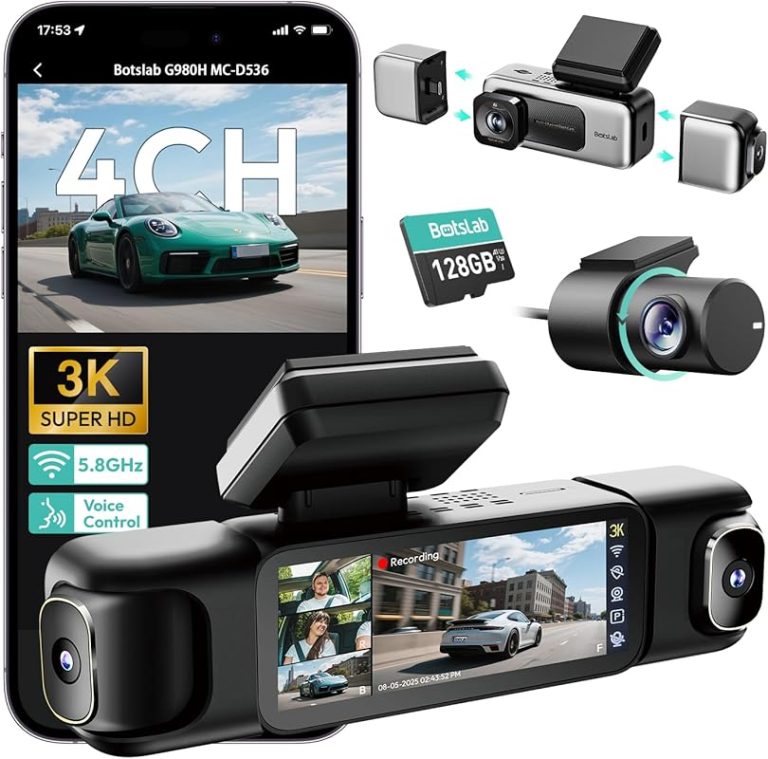
Rear view systems often prioritize a continuous image, recording, and a wider field of view. A rear camera dashcam may store video on a memory card and show footage on a built-in screen or phone.
Some systems add motion alerts, collision warnings, or cross-traffic detection. These features depend on the camera, vehicle wiring, and software. Treat alerts as assistance, not as a replacement for checking mirrors and looking behind you.
How Rear Visibility Technology Has Evolved
Your vehicle may use a basic camera aimed behind it or several cameras that create a wider view. These systems reduce blind spots, but they differ in coverage, display design, and how much driving information they provide.
Dedicated Reverse Cameras
A dedicated reverse camera, often called a backup camera or reversing camera, focuses on the area directly behind your vehicle. You usually find it near the trunk, rear hatch, license plate, or tailgate. When you select reverse, the camera sends a live image to your dashboard screen, rearview mirror display, or an aftermarket monitor.
Many systems add parking guidelines that show your projected path. Some guidelines move with your steering, while others remain fixed. The camera helps you detect low objects, nearby vehicles, and people who may not appear in your mirrors.
A reverse camera does not replace your side mirrors or direct vision. Its view can narrow, become blocked by dirt, or miss objects outside the camera’s angle. You should still check your mirrors, look over your shoulder, and scan the area before moving.
Multi-Camera And Surround-View Systems
Multi-camera systems combine images from cameras placed at the front, rear, and sides of your vehicle. Software can join these views into a 360-degree, top-down display that helps you judge nearby obstacles while parking. Some systems show separate front, rear, and side views instead of one combined image.
This setup gives you wider coverage than a dedicated reverse camera. It can help you spot curbs, posts, bicycles, and vehicles near your front corners or doors. Certain vehicles also use cameras to support blind-spot views, trailer assistance, or lane monitoring.
Surround-view images may look different from what you would see from above because the system creates the top-down view from camera feeds. You should use the display as a parking aid, not as a substitute for checking the road and your surroundings directly.
Choosing the Right Camera Setup
Choose a camera based on how you use your vehicle, where you need visibility, and how much installation work you accept. A backup camera supports reversing and parking, while a rear-view camera can provide a wider view during regular driving.
Aftermarket Installation Considerations
Check your vehicle’s design before buying a camera. Cars often use a license-plate or hatch-mounted camera, while trucks, trailers, and RVs may need a higher-mounted camera with a wider viewing angle. Confirm that the camera fits the mounting area and that the monitor supports its video connection.
A wired system usually provides a stable signal but requires routing cable from the rear of the vehicle to the dashboard. Wireless systems simplify installation, but nearby electronics, distance, and vehicle materials can affect the connection. Battery-powered cameras reduce wiring but require regular charging or battery replacement.
You should also check the power source. Many backup cameras connect to the reverse-light circuit, so the image appears when you select reverse. A rear-view camera used while driving may need a separate power connection and a monitor that you can control safely.
Features That Improve Safety
Select a camera with a clear image in daylight and low light. A wide viewing angle helps you see more of the area behind your vehicle, but an extremely wide lens can make objects look smaller or farther away. Night vision, glare control, and a weather-resistant housing help the camera work in changing conditions.
Parking guidelines can help you judge distance, especially when the system displays lines that match your vehicle’s path. Some cameras let you adjust these lines during installation. Motion alerts and blind-spot views may add useful information, but they should not replace direct checks of mirrors and surroundings.
For larger vehicles, consider a camera with a higher mounting position or a second side camera. Make sure the display remains visible without blocking your forward view, and keep the lens clean so dirt, water, or snow does not reduce image quality.
Frequently asked questions
Is a rear-view camera the same as a backup camera?
People often use these terms to mean the same thing. However, a backup camera usually refers to a camera that activates when you shift into reverse, while a rear-view camera may provide a continuous view behind your vehicle.
What does a backup camera show you?
A backup camera shows the area directly behind your vehicle. It helps you spot nearby obstacles while reversing, but it does not replace checking your mirrors and looking around before moving.
Can a rear-view camera stay on while you drive?
Yes, some systems provide a live rear-facing view while you drive. These cameras can support situational awareness, especially when your vehicle has limited rear visibility.
Do all rear-view cameras include parking guidelines?
No. Some systems display lines that estimate your vehicle’s path, while others show only the camera image. Dynamic guidelines may turn as you steer.
Can you install a backup camera in an older car?
Yes. Many aftermarket kits connect to a dashboard monitor, rearview mirror display, or compatible audio system. Check that the camera and screen work with your vehicle’s wiring and power system.
Can a dash cam replace a backup camera?
Usually not. A rear dash cam may provide a live image, but it might not activate in reverse or show the correct angle for parking. Check the system’s features before relying on it.
Conclusion
A rear-view camera and a backup camera can refer to similar equipment, but their intended uses may differ. A backup camera mainly helps you see the area directly behind your vehicle while reversing or parking.
A rear-view camera may provide a wider rear view for general driving. However, sellers and vehicle makers often use these terms interchangeably, so the name alone may not tell you what the camera does.
When choosing a camera, check its viewing angle, image quality, night vision, display, mounting location, and parking guidelines. Make sure it connects to your vehicle and supports your preferred use.
| Your main need | Best choice |
|---|---|
| Reversing and parking | Backup camera |
| Wider rear visibility while driving | Rear-view camera |
| Both uses | A camera designed for continuous rear viewing and reversing |
Check the product details before buying. This helps you choose a system that matches your vehicle and driving needs.