Do You Have to Pay a Monthly Fee for a Dash Cam?

Do you have to pay a monthly fee for a dash cam? Usually, no. Most standard models can record to a memory card without a subscription. A fee is more likely when you want cloud storage, cellular data, remote live view, longer video history, smart parking alerts, or other connected services.
Most drivers can use a basic dash cam without a monthly payment. Owners who want remote access or cloud backup may need a paid plan. The main limit is that canceling a plan can remove premium features, even when normal local recording still works.
The dash cam itself is usually a one-time purchase. You may also need a memory card, power cable, rear camera, hardwire kit, or professional installation.
A subscription is separate. It pays for an ongoing service rather than the camera hardware. The exact features and rules depend on the manufacturer and model.
For related product types and buying advice, visit our car electronics guide.
When a Dash Cam Has No Monthly Fee
A standard dash cam often saves video to a microSD memory card. It records while powered and overwrites older unlocked clips when the card becomes full.
This basic loop recording usually does not need a monthly plan. You buy the camera and any required storage card. Then you manage the files yourself.
A no-fee setup may still include useful features:
- Front, rear, or cabin video recording
- Loop recording to local storage
- Manual clip protection
- Impact-based file locking
- Screen playback on supported models
- Direct Wi-Fi transfer to a phone
- GPS data when built into the camera
These features vary by model. Check the current manual before buying. A free phone app does not always mean cloud service is free.
When a Subscription May Be Required
Monthly or annual fees are more common with connected dash cams. These models may use Wi-Fi, long-term evolution cellular service, or cloud servers.
Long-term evolution, often called LTE, lets a compatible camera send data through a mobile network. That service creates an ongoing cost for the manufacturer.
| Feature | Monthly Fee Likely? | What You Receive |
|---|---|---|
| Local card recording | Usually no | Video stored in the camera |
| Phone Wi-Fi transfer | Often no | Nearby clip downloads |
| Cloud video backup | Often yes | Online clip storage |
| Remote live view | Often yes | View the car from far away |
| LTE event alerts | Often yes | Remote notifications |
| Long video retention | Often yes | More cloud history |
Cloud Storage
Cloud storage keeps selected footage on the manufacturer’s servers. This may help when the camera or memory card is lost, damaged, or stolen.
Cloud plans can limit storage space, clip length, upload count, or retention time. Garmin states that its Vault online storage requires an active subscription on supported cameras. Review the official Garmin Vault instructions.
Cellular Data and Remote Access
A connected camera may use cellular data for remote live view, image alerts, location checks, or uploads. These features may need a paid protection plan.
Nextbase says its iQ can be used with a free service level, while premium plans unlock added connected features. Check the current Nextbase iQ subscription options before purchase.
Higher Cloud Limits
Some brands offer a limited free cloud level. A paid plan may increase live-view time, storage, downloads, or the number of registered cameras.
Plan names, prices, included data, and supported countries may change. The manufacturer pages above were checked on July 27, 2026.
What Happens If You Cancel?
Canceling usually removes the paid service at the end of the billing period. The camera may still record to local storage, but this is product-specific.
You may lose access to:
- Remote live viewing
- Cellular event notifications
- Automatic cloud uploads
- Longer cloud retention
- Remote file downloads
- Multiple user accounts
- Premium emergency or parking tools
Download important cloud clips before canceling. Also check whether stored videos are deleted when the plan ends or after a set period.
- Confirm which features work without a plan.
- Check monthly and annual billing terms.
- Look for automatic renewal after a trial.
- Review cloud storage and retention limits.
- Check the cancellation and refund rules.
- Confirm whether local recording continues.
- Review cellular coverage in your area.
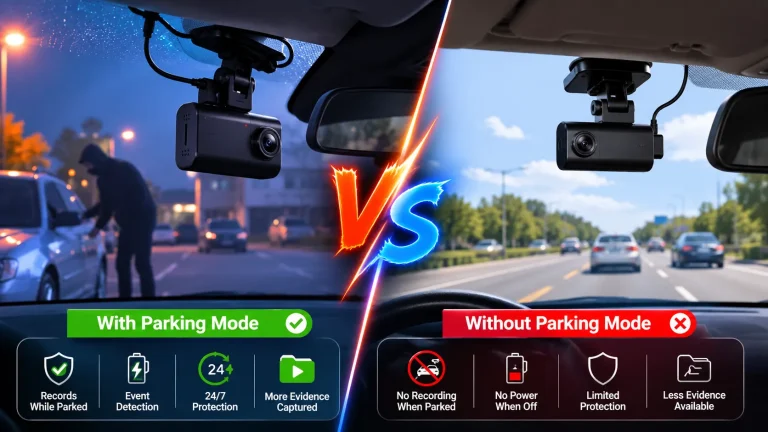
Parking Mode Does Not Always Cost Monthly
Parking mode and a subscription are not the same thing. Many cameras can record impacts or movement while parked without a monthly plan.
However, parking recording needs a power source. You may need a hardwire kit, external battery pack, or supported always-on outlet.
Remote parking alerts are different. They may need cellular data and a subscription because the camera must contact your phone while you are away.
Check: Confirm the vehicle voltage, power source, hardwire-kit support, windshield space, cable length, phone requirements, and cellular coverage. Limitations: Do not assume every parking feature works with every make, model, trim, hybrid, or electric vehicle.
Our tools and garage gear section can help you plan a basic installation. Check the vehicle manual before removing trim or accessing a fuse panel.
Other Costs to Expect
Even a subscription-free camera may have ownership costs. These are often one-time or occasional costs rather than monthly fees.
| Cost | One-Time or Ongoing? | Why It May Be Needed |
|---|---|---|
| Memory card | Occasional | Stores local footage |
| Hardwire kit | Usually one-time | Powers parking mode |
| Rear camera | Usually one-time | Adds rear coverage |
| Battery pack | Usually one-time | Supports parked recording |
| Installation | Usually one-time | Helps with safe wiring |
| Cloud or LTE plan | Recurring | Adds connected features |
Memory cards wear because the camera writes video repeatedly. Follow the manufacturer’s card type, capacity, and formatting instructions.
A promotional trial can also become a cost. Check the renewal date and payment terms before entering card details.
See our car care guide for other simple vehicle checks you can add to your routine.
Privacy Matters With Paid Features
Use a unique password and two-factor authentication when available. Keep the app and camera firmware current. Disable remote features you do not use.
The Federal Trade Commission recommends changing default passwords, using security features, installing updates, and turning off unused connected functions. Review its connected-device security guidance.
Before selling or giving away the camera, remove the card, delete cloud clips, cancel paid service, sign out, and reset the device as directed.
Do Paid Plans Make Driving Safer?
A subscription can add convenience, but it does not make the car crash-proof. Remote alerts and automatic backups may help after an event. They cannot replace alert driving.
NHTSA explains that non-driving activities can take attention away from the road. Review its official distracted-driving guidance.
You can also review our safety gear guide for other practical equipment. A dash cam should support safe driving, not distract from it.
Who Should Consider a Subscription?
A paid plan may make sense when remote access solves a real problem. It can suit owners who park on the street, manage several vehicles, drive for rideshare work, or need quick cloud backup.
It may also suit a family that shares a car and wants location-based or event alerts. Review the privacy impact before giving other users account access.
You may not need a plan if you only want road footage saved to a memory card. Local recording is often enough for drivers who can remove the card or connect to the camera nearby.
- You need remote alerts.
- You want off-camera backups.
- You manage more than one vehicle.
- You need longer cloud history.
- You only need local recording.
- You download clips in person.
- You do not want cloud storage.
- The premium features add little value.
How to Avoid an Unwanted Monthly Fee
- Read the product page: Look for words such as cloud, LTE, cellular, premium, connected, or protection plan.
- Open the plan comparison: Check which features are free and which are locked.
- Review the trial terms: Find the end date and renewal method.
- Check local recording: Confirm that the camera records without internet or cloud access.
- Price the whole setup: Include storage, wiring, installation, and optional services.
- Save the terms: Keep a copy of the plan details shown when you buy.
Do not confuse installment payments with a service subscription. Financing spreads the camera’s purchase price across several payments. A subscription pays for continuing features and may last until you cancel.
- Best for: A no-fee local camera suits drivers who mainly want dependable road footage.
- Think twice if: The useful features depend on a costly cloud or LTE plan.
- Next step: Compare the free feature list, cancellation terms, storage needs, and installation costs before buying.
Frequently Asked Questions
No, most basic dash cams do not need a monthly fee for local recording. They save video to a memory card. A subscription is more common for cloud storage, cellular data, remote viewing, event alerts, or longer online video history.
Cloud backup, remote live view, cellular event alerts, longer cloud retention, remote downloads, and multiple-user tools may require a plan. The exact feature list differs by brand and model, so check the current manufacturer plan page before buying.
Many models may continue recording to local storage after cancellation, but this is not guaranteed for every product. Premium cloud and remote features will usually stop. Check the camera manual and download important online clips before the plan ends.
Not always. Basic impact, motion, or time-lapse parking recording may work without a subscription. Remote alerts and cloud uploads may require a paid connected plan. Parking mode may also need a hardwire kit, battery pack, or other supported power source.
The basic app is often free, but some app features may require a subscription. Nearby Wi-Fi transfers may be included, while remote viewing or cloud storage may cost extra. Review the app listing and manufacturer plan details for the exact model.
Yes, many dash cams can record to a memory card without internet access. Internet service is mainly used for cloud backup, remote viewing, updates, or connected alerts. Confirm that the model supports full local recording before purchase.
Usually not. A free cloud level may limit storage, retention time, registered cameras, downloads, or live-view minutes. Paid plans may raise those limits. Check the current plan details because manufacturers can change features and terms.
Possible costs include a memory card, rear camera, hardwire kit, battery pack, replacement mount, and installation. Connected cameras may also have cloud or cellular fees. Compare the full ownership cost instead of looking only at the camera price.
Conclusion
You usually do not have to pay a monthly fee for a dash cam. A standard local-recording camera can work with a supported memory card and power source.
Owners should still budget for storage, wiring, and maintenance. Drivers should choose a safe mount and manage all settings while parked.
The main limitation is that remote, cloud, and cellular features may stop without a subscription. Before buying, confirm what works for free, what renews automatically, and whether the camera fits your vehicle and normal driving needs.