A dash cam that reboots mid-drive is telling you something about its power, storage, or environment — not necessarily that it is broken. The fix usually costs less than a new camera and takes less than an hour.
If your dash cam keeps restarting while driving, the cause is usually an unstable power source, a failing memory card, overheating, or a firmware issue — not a camera that needs replacing. This guide explains what a restart loop means, how to diagnose it in the right order, and when to stop and call a professional.
Key Takeaways
Power first: Test a second socket and cable before blaming the camera.
Card matters: Use a high-endurance card and reformat it monthly.
Heat is real: Direct sun can trigger thermal shutdowns on hot drives.
Hardwire carefully: Confirm fuse tap, ground, and low-voltage cutoff.
Know when to stop: Seek professional help near airbags, fuse boxes, or hybrid/EV systems.
Direct Answer: What Your Dash Cam Keeps Restarting While Driving Means for Owners and Drivers
A restart loop is exactly what it sounds like: the camera powers up, begins recording, then shuts down and boots again — sometimes every few minutes, sometimes every few seconds. For owners, the practical result is missing footage at the moment it matters most, corrupted video files, and a device that cannot be trusted as evidence. For drivers, the repeated startup chimes and screen flashes add an unnecessary distraction.
Most restart loops are not a sign that the camera is dead. Based on owner reports and manufacturer troubleshooting guides, the usual culprits are an unstable 12-volt socket, a worn or under-rated power cable, a failing memory card, a firmware bug, or heat buildup. A smaller number of cases trace back to a hardwire installation with the wrong fuse tap, a poor ground connection, or no low-voltage cutoff.
How It Works and What It Can Actually Do
A dash cam records road footage while drawing power from the car’s electrical system.
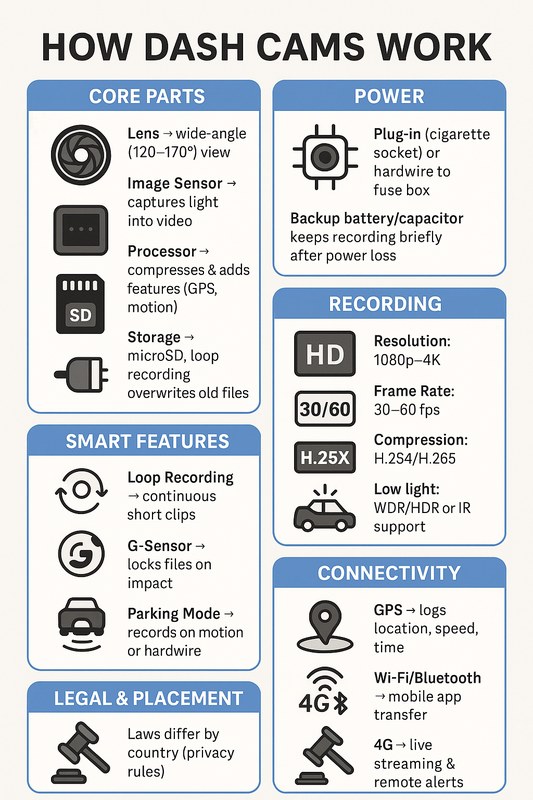
A dash cam is a small computer with a camera sensor, a processor, storage, and a power management circuit. During a drive, it writes video continuously to a memory card in short loop-recording segments. When a segment fills, it overwrites the oldest footage. That constant writing is demanding, which is why memory cards are a common failure point.
Power is the other half of the equation. Most dash cams accept power from a 12-volt accessory socket or a hardwire kit that taps the vehicle’s fuse box. The camera needs steady voltage above its minimum threshold. If voltage dips — during engine cranking, when a high-power accessory turns on, or because a cable has worn contacts — the camera shuts down. When voltage returns, it boots again. That cycle is the restart loop.
Some cameras also shut down to protect themselves from heat. A windshield-mounted camera in direct summer sun can exceed its internal operating limit, and the processor will intentionally power off rather than risk damage. The result looks like a software or power fault, but the cause is thermal.
Vehicle Compatibility and Installation Requirements
Not every vehicle delivers power the same way. Some accessory sockets are switched, meaning they only work when the ignition is on. Others stay live for a period after the engine shuts off, and some are always powered. A camera that restarts during engine cranking may simply be reacting to the normal voltage drop that happens when the starter draws current. That is often normal behavior, not a defect.
If you use a hardwire kit, compatibility becomes more specific. Fuse boxes use different fuse sizes — mini, micro, low-profile, and standard blade types — and the kit must include the right tap for your vehicle. The ground connection must be clean and tight, and the fuse tap must be installed in the correct orientation. Many hardwire kits include a low-voltage cutoff that stops drawing power before the vehicle battery is drained; without one, parking mode can leave you with a dead battery.
Vehicle Compatibility
Check: Verify your vehicle’s make, model, year, and trim, then confirm the accessory socket behavior, fuse type, and whether the camera’s power requirements match. Limitations: Hybrid and electric vehicles may have different accessory power behavior and battery management; consult the vehicle manual before tapping any circuit.
For many owners, a dash cam hardwire kit with a low-voltage cutoff is the most reliable way to get stable power, because it bypasses the accessory socket entirely and connects directly to the vehicle’s electrical system.
Safety, Visibility, Power, and Driver-Use Considerations<
A dash cam mounted behind the rearview mirror with its power cord routed along
/h2>
Where you mount the camera matters as much as how it is powered. The camera should sit behind the rearview mirror, within the area swept by the windshield wipers, and out of the driver’s line of sight. Many states restrict objects mounted in the windshield area, and federal visibility rules for commercial vehicles require an unobstructed view. Check your state’s law before mounting anything.
The restart loop itself can also distract the driver. Each reboot produces a startup chime, a screen flash, or both. If your camera is restarting repeatedly, the alerts become a hazard. Many cameras let you mute startup sounds or disable the display; doing so reduces distraction while you work through the diagnosis.
Features, Limitations, and Ownership Costs
Some features directly affect restart reliability. Cameras with a supercapacitor instead of an internal lithium battery handle heat better and are less likely to shut down in summer sun. A low-voltage cutoff protects both the camera and the vehicle battery. Loop recording, event locking, and parking mode are useful, but none of them matter if the camera cannot stay powered.
There are real differences between budget and expensive dash cams in processor cooling, power management, and memory-card tolerance. A budget camera that restarts on a marginal card may run fine with a high-endurance card, while a premium camera may tolerate more abuse. That said, price alone does not guarantee a restart-free experience.
Ownership costs go beyond the purchase price. A high-endurance memory card is the single most important accessory; a standard card will eventually fail under continuous write load. Replacement cables, fuse taps, and mounting hardware add modest cost. If you pay a professional to run a hardwire kit, labor becomes the largest expense. Before buying a replacement camera, compare the cost of a new card and cable against the cost of a new unit — and check the manufacturer’s warranty, since a restart loop may be covered.
Setup, Testing, and Maintenance
Work through the diagnosis in a safe, logical order. Do not disassemble the camera, pry open the power adapter, or modify the fuse box unless you are confident and the vehicle manual allows it.
1
Confirm the power source
Try a different accessory socket and a known-good cable. If the camera stays on, the original socket or cable was the problem.
2
Test the memory card
Format the card inside the camera using the camera’s own menu, then try a high-endurance card from a reputable brand. If the loop stops, the card was failing.
3
Update the firmware
Check the manufacturer’s support page or app for a newer firmware version. Install it while the camera is connected to a stable power source.
4
Check for heat
Park in the shade, remove the camera from direct sun, and see whether the restart happens only on hot days or long drives.
5
Inspect hardwire connections
If you use a hardwire kit, verify the fuse tap orientation, the ground connection, and the low-voltage cutoff setting.
6
Test while parked
Run the camera for 30 minutes while parked with the engine running, then with the engine off, and note when the restart happens.
Common Mistakes and When to Get Professional Help
The most common mistake is replacing the camera before testing the cheap parts. Owners often buy a new unit, only to see the same restart loop because the original cable or card was the real problem. Another frequent error is using a standard memory card instead of a high-endurance card rated for continuous recording. Ignoring polarity and fuse orientation during a hardwire install is more serious — it can damage the camera or the vehicle’s electrical system.
Know when to stop. If you are uncomfortable working near the fuse box, airbags, or high-voltage components in a hybrid or EV, stop and consult a professional. If the camera still restarts after a new cable, a new card, and a firmware update, the camera itself may be faulty — check the warranty before buying anything else. Professional installation adds labor, but it removes the risk of a bad ground or an incorrect fuse tap. Many owners find that professional dash cam installation costs are worth it for a clean, reliable hardwire setup.
Also remember that recording laws vary by state. Audio recording, windshield mounting, and even camera placement can be regulated differently depending on where you drive. A restart loop is not a legal issue, but the footage it produces can be, so keep your setup compliant with local rules.
Final Recommendation
Start with the simplest fix and work up. In most cases, a restart loop ends with a new high-endurance memory card or a better power connection — not a new camera. If you use a hardwire kit, confirm the fuse tap, ground, and low-voltage cutoff before assuming the camera is defective.
Final Verdict
Best for: Owners who want to keep their current camera and solve the restart loop with a card, cable, or power-source fix.
Think twice if: The camera still restarts after a new card, cable, and firmware update — at that point the unit itself may be faulty and worth replacing under warranty.
Next step: Format a high-endurance card in the camera, test a second power source, and update firmware before considering a replacement.
Frequently Asked Questions
Most restart loops come from an unstable power source, a failing memory card, overheating, or a firmware bug. Work through the power source and memory card before replacing the camera.
Yes. Dash cams write video constantly, and a failing or low-quality card can trigger write errors that force a reboot. Format the card inside the camera or replace it with a high-endurance card.
Often yes, if the problem is an unstable accessory socket. A hardwire kit with a low-voltage cutoff provides cleaner power, but only when the fuse tap and ground connection are installed correctly.
The camera itself is not a safety risk, but repeated startup chimes and screen flashes can distract you. Mute alerts and fix the issue before relying on the camera for evidence.
Yes. A high-endurance card rated for continuous recording is recommended because standard cards wear out quickly under constant write load and are a common cause of restart loops.
Seek professional help if you are not comfortable working near the fuse box, airbags, or high-voltage hybrid or EV components, or if the camera still restarts after a new cable, card, and firmware update.
Hi, I'm Ethan Carter, and I've spent over a decade testing automotive electronics, dash cams, and interior accessories. I created TopBestCar.com to help car owners cut through marketing hype and find gear that actually performs for their exact make and model — backed by hands-on testing, spec comparisons, and real owner feedback.