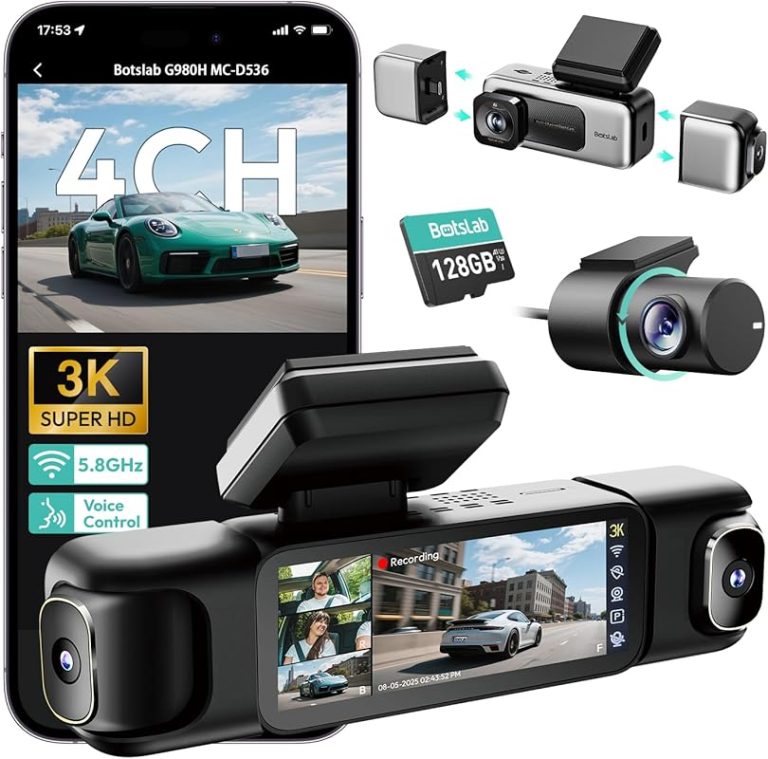
What Is Rear View Camera and Why You Need One

A rear view camera helps you see behind your vehicle when backing up, and the best choice depends on whether you want simple parking visibility, recording, or both. Before buying, check compatibility, power needs, mounting rules, and privacy settings so the system improves safety instead of adding hassle.
what is rear view camera? It is a camera-based visibility system that shows what is behind your vehicle, usually on a screen in the cabin, so backing up and parking are easier and safer. For U.S. drivers, the right setup depends on your vehicle, your parking habits, and whether you want a simple backup aid, a recording device, or both.
- Safety first: A rear camera helps spot low obstacles, people, and curb edges when reversing.
- Choose by use case: Backup cameras, rear dash cams, and mirror systems solve different problems.
- Compatibility matters: Check voltage, display fit, wiring path, and vehicle electronics before purchase.
- Privacy is part of ownership: Review audio recording, app permissions, cloud storage, and account security.
- Maintenance is simple but important: Clean the lens, inspect the mount, and replace worn storage cards when needed.
What Is a Rear View Camera? A Simple Definition and How It Works
A rear view camera is a camera mounted on or near the back of a vehicle that sends a live image to a display in the cabin. Most systems are designed to help you see low objects, people, curbs, and blind spots behind the vehicle when reversing.
In everyday use, the camera captures video, a cable or wireless link sends the image forward, and the display shows a wide-angle view of the area behind the car. Some systems turn on automatically when you shift into reverse, while others can be viewed manually or through a phone app, depending on the product.
Rear view camera is a broad phrase, and drivers often use it to describe backup cameras, dash cams with rear channels, and mirror-mounted displays. The function is similar, but the installation, image quality, storage, and power needs can be very different.
Why Rear View Cameras Matter for U.S. Drivers in 2025
Rear visibility is a daily safety issue in crowded driveways, school pickup lines, apartment lots, and tight street parking. A rear view camera can reduce the chance of bumping low obstacles or missing a child, pet, shopping cart, or post that sits below the rear window line.
They also help newer drivers and larger vehicles, including SUVs, pickups, vans, and tall crossovers, where the rear window may not show everything behind the vehicle. Even in vehicles with good mirrors, a camera can fill in the area directly behind the bumper that mirrors cannot cover.
Rear View Camera Types: Backup Cameras, Dash Cams, and Mirror-Mounted Options
Before buying, it helps to separate the main categories. If you want a broader shopping view, TopBestCar also covers the best rear view camera options and the differences between a budget dash cam front vs rear setup.
Which drivers benefit most from each type
Backup cameras are usually the best fit for drivers who mainly want help while reversing. They are useful for families, daily commuters, and older vehicles that do not already have a factory camera.
Dash cams with rear cameras are better for drivers who want both driving footage and rear coverage. Rideshare drivers, road-trip users, and owners who want incident documentation often prefer this category.
Mirror-mounted systems can work well when you want a cleaner dashboard or a display that sits close to the mirror line. They are often appealing in vehicles with limited dash space or when the driver wants a more OEM-style look.
How image quality, field of view, and display behavior differ
Backup cameras often prioritize a wide field of view and low-speed visibility over recording detail. Dash cams usually focus more on video evidence, so they may emphasize resolution, frame rate, and storage management.
Mirror-mounted options can be easy to glance at, but the display may be smaller or harder to read in bright sunlight. Some systems show a static reverse image, while others overlay parking lines, split screens, or alerts that can help with alignment but may also add visual clutter.
| Option | Best for | Owner consideration | Driver consideration |
|---|---|---|---|
| Backup camera | Reverse parking and curb visibility | Usually simpler wiring and lower cost | Best when the display is quick to read |
| Dash cam with rear channel | Recording and rear coverage | Needs storage, power, and sometimes app setup | Can help with incidents, but may add menu complexity |
| Mirror-mounted system | Cleaner cabin layout | Fit and mirror compatibility matter | Convenient if the screen is easy to see at a glance |
Buying Guide: Key Features That Actually Affect Safety and Usability
When shopping, focus on features that affect what you can see, how reliably the camera works, and how much maintenance it needs. Fancy extras can be useful, but they should not come before image stability, mounting quality, and compatibility.
Resolution, night performance, and weather resistance
Resolution helps, but it is only one piece of the picture. A sharp camera with poor low-light performance may still be hard to use in a dark garage or rainy night, while a lower-resolution camera with strong exposure handling can be easier to trust in real driving.
Weather resistance matters for external rear cameras because they face rain, salt, heat, dust, and car washes. If the camera is exposed outside the cabin, check the product’s environmental claims in the manufacturer documentation rather than assuming it can handle every condition.
If you are comparing recording-focused models, you may also want to read whether a 4K dash cam is worth it, since higher resolution can improve detail but usually increases storage demands.
Storage, app access, cloud features, and privacy controls
Recording systems need storage management. That can mean a memory card, internal memory, a phone app, or cloud features, depending on the product.
Cloud access can be convenient if you want remote clips or event notifications, but it also adds account security and privacy concerns. Review whether the app requests location data, whether clips are retained in the cloud, and whether you can delete footage easily.
Parking mode, battery protection, and power draw
Parking mode can be useful when a vehicle is parked in public lots or on the street, but it depends on how the camera is powered. Some systems use the vehicle battery, some use a dedicated hardwire kit, and some rely on a separate battery pack.
Battery protection is important because a camera that draws too much power while parked can leave the vehicle unable to start. Look for low-voltage cutoff settings or follow the installer’s guidance for your specific vehicle and battery type.
A good rear camera can save time during daily parking, reduce minor contact damage, and provide footage if another driver backs into you. For many owners, that practical value is more important than any single spec number.
Compatibility Checklist: Vehicle Fit, Power Source, and System Limits
Compatibility is where many good camera purchases go wrong. A model can be excellent on paper and still be a poor fit if your vehicle has limited mounting space, unusual power requirements, or a factory system that does not accept the same connections.
Check: Verify make, model, year, trim, voltage, ports, mounting space, and OEM requirements. Limitations: Some vehicles need adapters, a specific display interface, or professional integration.
12V/24V compatibility, OBD use, and hardwire basics
Most passenger vehicles use 12V electrical systems, while some commercial vehicles use 24V. Do not assume a camera or power kit will work on both unless the manufacturer clearly says so.
OBD power accessories can be convenient, but they are not universal and may not be the best choice for every car. Hardwire kits can provide cleaner wiring and parking-mode support, but they must be installed carefully and according to the product instructions.
Display integration, sensor interference, and camera placement constraints
Some vehicles already have factory screens, parking sensors, or driver-assist cameras that may affect where an aftermarket camera can be mounted. A poor placement can block the rear hatch, interfere with a license plate light, or create a view that is too low or too high to be useful.
Display integration also matters. A camera that works on a mirror monitor may not connect to an OEM infotainment screen without extra hardware, and some vehicles limit what can be added without affecting factory systems.
When a vehicle or electrical system needs professional installation
Professional installation is worth considering if the wiring must pass through trim panels, the rear hatch, a trailer area, or a complex fuse box. It is also a smart choice if your vehicle has advanced electrical architecture, hybrid/EV components, or you are unsure about preserving warranty coverage.
If installation requires working near airbags, high-voltage components, or critical vehicle controls, do not guess. Follow the manufacturer’s instructions or use a qualified installer.
Installation Guide: Mounting, Wiring, and Calibration Basics
Good installation affects both safety and image quality. Even a strong camera can perform badly if it is mounted crooked, wired poorly, or aimed at the wrong angle.
Verify the vehicle, power, ports, mounting space, hardware, and manufacturer instructions.
Keep cables and hardware away from airbags, pedals, controls, sensors, and moving parts.
Complete setup while parked, verify key functions, and secure all parts before driving.
Best mounting locations for rear visibility and legal compliance
The best mounting location is one that gives a clear rear view without blocking lights, plates, or the driver’s sightlines. On many vehicles, that means near the license plate area, the tailgate handle, or a rear-facing trim location designed by the product manufacturer.
For windshield-mounted displays or dash cams, remember that state rules can affect where devices may be placed. Keep the driver’s forward view unobstructed and follow local rules for windshield attachments and display placement.
Wiring routes, fuse taps, reverse light connections, and cable management
Backup cameras often connect to the reverse light circuit so they turn on when the vehicle shifts into reverse. Dash cam rear channels are usually routed through the cabin to a front power source or hardwire kit.
Use clean cable routing so wires do not hang near pedals, seat rails, or cargo areas. If you use a fuse tap, make sure the circuit choice is appropriate and that the installation follows the camera maker’s instructions and the vehicle’s fuse-box layout.
Calibration, angle adjustment, and common setup mistakes
After mounting, the camera should be aimed so the bumper edge is visible enough to judge distance, but not so much that it blocks the rear scene. Parking guidelines, if included, should match the actual path of the vehicle as closely as possible.
Common mistakes include mounting the camera too high, aiming it too steeply downward, leaving the lens partially blocked, or forgetting to test the image in daylight and at night. If the view looks distorted or delayed, recheck the mount and the cable path before assuming the camera is defective.
Keep the lens clean, inspect the mount after car washes or winter weather, and update firmware when the manufacturer provides a fix for stability or app issues. Replace storage cards if they start causing dropped footage or file errors.
Legal and Privacy Considerations: What U.S. Drivers Should Know
Camera use touches both visibility and privacy. A setup that is convenient for one driver may create legal or privacy issues for another, especially if it records audio or uses a visible display in a way that local law restricts.
State-by-state differences in camera placement and windshield rules
U.S. rules are not identical from state to state. Some states are more specific about windshield-mounted devices, while others focus on whether the driver’s field of view is obstructed.
If your system includes a screen, make sure it does not become a distraction or block the road view. When in doubt, verify current state guidance before installing anything on the windshield or dashboard that could be considered an obstruction.
Audio recording, app permissions, cloud retention, and account security
Some dash cams record audio by default, while others let you disable it. That can matter if you carry passengers, family members, or rideshare riders who expect a certain level of privacy.
App permissions are another concern. Review whether the camera app needs location access, background data, microphone access, or cloud account login, and use a strong password if the system stores clips online.
How to stay compliant while protecting passengers and data
The safest approach is simple: mount the device so it does not block visibility, disable features you do not need, and keep passenger-facing recording transparent where required. If you use a camera for rideshare or family transport, clearly explain when recording is active and review the platform’s rules as well as state law.
For more on product selection and use cases, the guide to the rear view camera basics can help you compare what each system is meant to do before you buy.
Maintenance, Troubleshooting, and Ownership Costs
Rear cameras are usually low-maintenance, but they are not maintenance-free. Dirt, heat, vibration, and storage wear can all reduce reliability over time.
Cleaning lenses, checking mounts, updating firmware, and replacing storage cards
Clean the lens with a soft cloth and a safe cleaner when road film, salt, or water spots start to affect the image. Check the mount periodically, especially after extreme temperatures, wash cycles, or rough roads.
If your camera uses a memory card, replace it when the manufacturer recommends it or when you notice recording errors. Firmware updates can improve app stability, recording behavior, or parking-mode performance, but they should be installed carefully and only from the official source.
Common problems: blurry video, signal loss, false alerts, and power issues
Blurry video often comes from a dirty lens, moisture, incorrect focus, or a camera mounted behind tinted or dirty glass. Signal loss can happen with loose connectors, damaged cables, wireless interference, or poor power delivery.
False alerts may come from overly sensitive parking settings or a poorly chosen detection zone. If the camera turns off unexpectedly, check battery protection settings, fuse connections, and whether the vehicle’s accessory power behavior matches the camera’s needs.
Real-world costs: hardware, installation, subscriptions, and replacement parts
Ownership cost is more than the camera box. You may also pay for mounting hardware, a hardwire kit, memory cards, professional installation, cloud storage, or replacement cables over time.
Which Rear View Camera Is Right for You? Driver and Vehicle Recommendations
The best choice depends on what problem you are trying to solve. If you mainly want help backing into spaces, a backup camera is often the simplest answer. If you want evidence from the road and behind the vehicle, a rear dash cam setup may be better.
Best fit for daily commuters, families, rideshare drivers, trucks, and older vehicles
Daily commuters usually want easy parking help and low distraction, so a simple backup camera or mirror-mounted display can make sense.
Families often benefit from a wide rear view and clear parking lines, especially in driveways and school lots.
Rideshare drivers and road-trip users may prefer a recording system with a rear channel, app access, and storage management.
Trucks and larger SUVs often need a camera with a strong field of view and a display that is easy to read from a higher seating position.
Older vehicles may need the most careful compatibility review because they can lack factory displays, modern wiring conveniences, or plug-and-play integration.
When to choose a backup camera, dash cam, or a combined system
Choose a backup camera if your main goal is reversing safety and parking confidence. Choose a dash cam with rear coverage if you want driving evidence, incident recording, and optional parking-mode protection.
A combined system makes sense when you want both functions and are willing to manage more wiring, more settings, and possibly more maintenance. If you are still deciding, compare a dedicated backup setup with a budget dash cam front rear system to see which ownership trade-offs fit your vehicle and habits.
- Best for: Drivers who want safer reversing, better visibility in tight spaces, and optional incident recording.
- Think twice if: Your vehicle has complex electronics, limited mounting space, or you are not ready to verify wiring, privacy, and state rules.
- Next step: Check your vehicle’s fit, power source, and display options before buying so the camera actually improves safety and usability.
Frequently Asked Questions
Not always. Fit depends on the vehicle’s power system, mounting space, display compatibility, and whether the camera needs a factory screen or a separate monitor.
It can be, if the product is designed for DIY installation and you follow the manual carefully. Stop and use a professional if wiring must pass near airbags, pedals, moving seats, or complex electrical systems.
They can, especially if parking mode is enabled or the camera stays powered when the vehicle is off. Look for low-voltage protection and follow the manufacturer’s power guidance.
No. Rules can vary for windshield placement, display visibility, recording, and audio, so check your state’s current guidance before installing.
Usually not much, but you should clean the lens, inspect the mount, update firmware when needed, and replace worn memory cards if the system uses recording storage.
Check compatibility, image quality, low-light performance, storage, app controls, power draw, warranty, and whether the installation will affect visibility or privacy.